
A few banks apparently act without awareness of well-known security practices. It is blatantly obvious from a customer’s perspective that they are either clueless or just don’t care about the perceived security risks they have created.
Security experts say…
Average online consumers don’t want to become victims of online fraud so they turn to experts in security for advice. Let’s review some of this advice and apply it to consumers using online banking.
I’ll borrow some ideas from this blog post at A2 Hosting (link no longer available) titled, “What Is Phishing? Tips To Protect Yourself From Phishing Scams“
How to Recognize Phishing
Although phishing emails are increasingly convincing, there are still ways to recognize scams. Here are some of the most common ways to recognize a phishing attempt: (I’m cherry picking the article to make my point)
URLs That Don’t Match the Organization: Hover over links to see their true destination. Malicious URLs often mimic real ones but include slight variations (e.g., “A2h0sting.com” instead of “A2hosting.com“).Messages from Unknown or Suspicious Senders: Emails or messages from unrecognized addresses should raise suspicion. Example: An email from “support@random-company.ru” claiming to be your bank.
First on my review list is United Fidelity Bank (yes, there are more)
The Security Problem
The URL for United Fidelity Bank is www.unitedfidelity.com however when you login to your account at that bank the address bar shows https://web15.secureinternetbank.com/. That is a bad security practice. As a consumer you have been taught to beware of URLs that do not match the organization.
The Bank’s Security Advice to Customers
United Fidelity Bank has their own warning about security threats posted on their website. Take a look at their definition of Pharming.
Pharming is when a criminal obtains the domain name of a bank and uses it to get victims to visit the site which looks like the bank’s. Clicking on this site will take you to another site where any information stored can be seen by the criminal. The act of Pharming is only possible when the original website was not properly protected and the user ignores warnings about the invalid server.
Actions counter to the Bank’s own advice to customers.
When the bank’s URL is on brand unitedfidelity.com and then the customer facing part of your account shows secureinternetbank.com in the address bar of your browser it appears your account has been redirected to a non-bank address. In fact, it has.
How the Bank’s duplicity affects the Customer’s experience.
Were you warned about this by the bank? No. However, you were warned about Pharming hazards by the bank. The bank warned you about the bad guys and then they act just like the bad guys. Banks thrive on trust yet in this instance they have done a very good job of jeopardizing that trust.
How digital banking is implemented.
Banks focus on banking. That is their expertise. They hire contractors to implement the tech that provides their customers with the necessary tools for online banking. Banks are still responsible for the final product. In this example United Fidelity Bank fails in two ways. First, the URL for online banking is not aligned with the bank’s domain name, unitedfidelity.com. Secondly, they fail to brand consistently through all their digital assets which reduces trust in the organization. As an online banking customer I question whether I am actually doing business with the bank or some other entity? I worry, is my money really secure? Will I try to log in sometime in the future only to find I cannot login and my money is gone? United Fidelity Bank is FDIC insured. Secureinternetbank.com is not FDIC insured.
Search to find the domain name owner.
I used ICANN Lookup and found the domain secureinternetbank.com is owned by Fiserv, not United Fidelity Bank. Looking into https://www.fiserv.com/ they were listed as FISV on NASDAQ in 1986. They have been around a long time and have lots of experience with lots of customers who are bankers. Fiserv should know better. Security is an integral part of their expertise. Fiserv is failing their banking clients by (apparently) taking custody of the bank’s customer data. The banks are failing their customers by (allegedly) allowing a contractor to manage their customers’ data. A search on FDIC produced no results for fiserv.com or secureinternetbank.com. Fiserv Trust Company, closed in 2018 according to a search on FDIC. My conclusion is secureinternetbank.com is not insured by FDIC.
The disconnect dilemma
I searched all the documents I received from United Fidelity Bank when I signed up for an account. These are the Deposit Account Agreement & Disclosures, Deposit Rates & Terms, and Electronic Notice and Consent Agreement. They make no mention of Fiserv or any of their technology like secureinternetbank.com These are important documents that I was asked to acknowledge reading before being accepted as a customer, implying that I agree to all of its content. (BTW Who is Fidelity Federal Bancorp in relation to United Fidelity Bank? Also not found in my FDIC search.)
I have no knowledge of the relationship between Fiserv and United Fidelity Bank. However, at face value, from a consumer’s perspective, my money is not with United Fidelity Bank and not FDIC insured. I welcome input from a recognized authority that can prove me wrong.
At a minimum, United Fidelity Bank should disclose the relationship it has with secureinternetbank.com in their Deposit Account Agreement so the customer can be aware and also provide their consent to doing business under those circumstances. Even with that disclosure the bank should specifically state that funds displayed at secureinternetbank.com are covered by the FDIC insurance policy that covers United Fidelity Bank.
My advice to United Fidelity Bank
Clearly state at the point your customer is logging into their account that the domain name will be secureinternetbank.com. Disclose other situations in your on-boarding documents when and where domain names will not be unitedfidelity.com
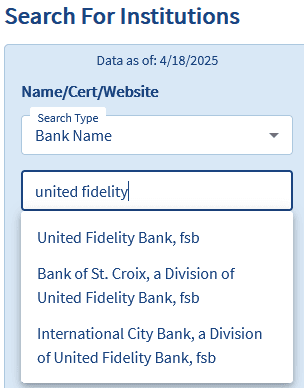
Your branding in the on-boarding documents should stick to one entity. Don’t mix Bank of St. Croix, or International City Bank in with United Fidelity Bank. I am only dealing with one institution. Is it really that hard to have uniquely branded documents? I suggest you segment these documents for customers intending to do business with just one bank, not all three?
Pay close attention to the optics from a consumer’s perspective. You want consumer confidence and trust to be associated with your brand. If your contractor who provides the digital banking technology has your trust tell your customer. I asked a security expert I know to review this post and he said,
From a security standpoint, your concerns are valid across the board. The disconnect between a bank’s branded domain and the login portal is a classic red flag we train people to look out for. So when legit institutions use third-party domains like secureinternetbank.com without clear disclosure, they’re basically conditioning users to ignore one of the most fundamental phishing indicators. That’s dangerous.
Security’s not just about doing things right behind the scenes, it’s also about making people feel secure up front.
A win, then another fail.
You can put this one in the win column. The emails received from United Fidelity Bank use the email donotreply@unitedfidelity.com which is a good security practice and branding practice.
But wait, there’s more.
The messaging app available when logged into my account on https://web15.secureinternetbank.com/ has some disturbing practices. While logged into my account I chose to compose a message on their internal messaging service. The domain name is different, securebanksolutions.com. The From field shows an email address formatted as <my social security number>@link.securebanksolutions.com. An ICANN search for securebanksolutions.com reveals the same owner, Fiserv.
I don’t know where this message will be sent. I don’t know the level of security of the mail server or the recipient’s equipment. All I know is my SSN has become a USER ID in yet another database hosted on a different domain. None of this was made known to me when I signed up for the account. It only takes one data breach and I’ve potentially lost my money and my identity to bad actors. All of which could be avoided with better system design and security practices. My security expert offered this observation.
The part about your SSN being used in a message header? Yeah, that’s a huge no-no in my book. There’s absolutely no excuse for sensitive identifiers like that to be showing up in any internal messaging system, let alone linked to third-party domains. That’s a breach waiting to happen.
Next Steps
United Fidelity Bank’s livelihood as a bank is founded on trust. Under the current conditions the optics are horrible for building a trusting relationship. I offered some guidance as a layperson, not a security expert. Here are some more resources for bankers if cybersecurity is outside your wheelhouse but affects your bottom line.
The Office of Comptroller of the Currency regulates banks and thrifts. They have a program on cybersecurity. Click HERE to get started.
Blog
This section provides an overview of the blog, showcasing a variety of articles, insights, and resources to inform and inspire readers.

Security Schmurity – Banks that fall short of expectations
Trust is broken when the appearance of security problems are present. How one bank…
Unhinged – Cabinet Doors
Feel like you are in a constant cycle of replacing your cabinet door hinges?…